A photograph, a song and a film can all become smaller files, but they do not necessarily become smaller in the same way. Compression changes how information is represented. Some methods preserve the original data exactly; others deliberately discard detail to reduce the amount that must be stored or transmitted.
Understanding that distinction helps when exporting artwork, sending a recording, archiving footage or judging a streaming picture. The useful question is not simply how small a file can become. It is which information must survive, how the result will be used, and what the receiving device can decode.
Start with the uncompressed numbers
Consider an image that is 4,000 pixels wide and 3,000 pixels tall. If every pixel contains three 8-bit colour channels, its pixel data requires 4,000 × 3,000 × 3 = 36,000,000 bytes: 36 MB in decimal units, about 34.3 MiB. That excludes metadata, row padding and any additional channels. A compressed photograph can occupy far less storage while retaining the same pixel dimensions.
For another worked example, one minute of stereo PCM audio at 48,000 samples per second and 24 bits per sample contains 48,000 × 24 × 2 × 60 = 138,240,000 bits, or 17.28 MB of sample data. These calculations describe specific uncompressed representations. They are not predictions of the eventual compressed sizes.
Resolution, duration, frame rate, channel count and bit depth describe the material being represented. Compression determines how economically that material is encoded. Resizing an image is a separate operation: it changes the pixel grid itself. Both operations can reduce storage, but their effects differ.
Two different promises
Lossless compression promises that decoding restores the original input values exactly. PNG, for example, uses reversible filtering and compression to preserve its image samples. That promise applies to what entered the encoder; it cannot undo an earlier resize, colour conversion or lossy export. Lossy compression permits a reconstructed result that differs from the input. Common photographic JPEG uses this approach, although the broader JPEG 1 standard also includes a lossless mode. 12
| Approach | What decoding restores | Typical purpose |
|---|---|---|
| Lossless | The encoded input values exactly | Data preservation and images where every sample matters |
| Lossy | An approximation of the input | Smaller distribution copies of photographs sound and video |
“Looks the same” is a perceptual judgement; “contains the same values” is a numerical claim. A graphic can look unchanged at ordinary viewing size while containing many altered pixels. Conversely, two files can contain the same image samples but have different metadata and therefore different file bytes.
How repetition becomes shorter instructions
Suppose a row contains twenty identical orange pixels. An illustrative run-length representation could store “orange, repeated twenty times” instead of recording the colour twenty times. The decoder expands the instruction. A row of unrelated colours offers little help to that particular method. This is a teaching example, not the complete encoding used by PNG.
DEFLATE combines two ideas. LZ77-style matching replaces repeated sequences with references to earlier data, while Huffman coding assigns compact binary codes according to symbol frequencies. The stream also needs enough information to interpret those codes. Compression therefore involves overhead as well as savings; a shorter description is useful only if the decoder can understand it. 3
PNG first prepares each image row using a reversible filter, such as differences from neighbouring bytes, and then compresses the filtered stream with DEFLATE. Nearby image values often resemble one another, so those differences may be easier to encode. The filtering itself loses nothing. A decoder reverses both stages to recover the samples. 1
Prediction can still be exact
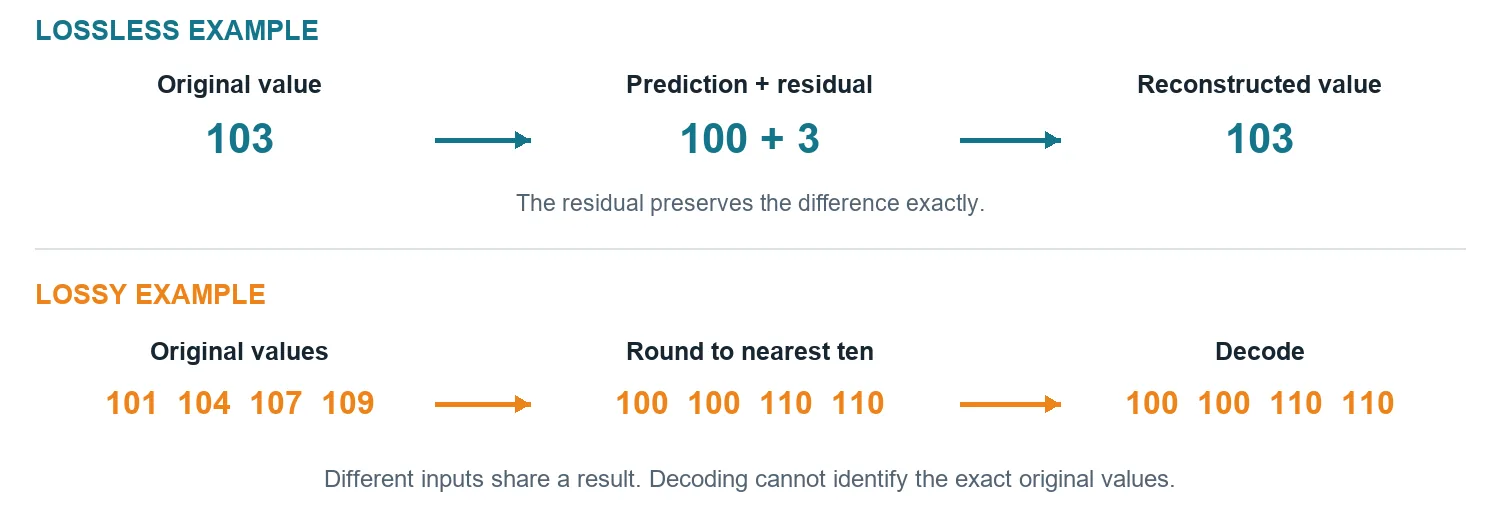
Prediction sounds like guessing, but a predictive codec can preserve every value by storing its mistakes. If a predictor expects 100 and the real value is 103, the residual is +3. Storing the prediction rule and the residual lets the decoder reconstruct 103. The prediction alone would be approximate; prediction plus an exact residual can be lossless.
FLAC applies this principle to audio. It models blocks of samples and encodes the residual efficiently, including through Rice coding. The model parameters also occupy space, so a more elaborate predictor is not automatically better. Decoding restores the input PCM samples; the compression does not improve the microphone recording or remove noise that was already present. 4
Where a JPEG photograph loses detail
In the familiar DCT-based JPEG process, each 8 × 8 component block is represented by coefficients describing patterns of variation. The discrete cosine transform changes the representation from individual samples to these patterns. Quantisation then divides coefficients by chosen step sizes and rounds them. Small contributions may become zero, making the coefficients easier to encode compactly. 5
For a simple quantisation analogy, rounding 101 and 104 to the nearest multiple of ten produces 100 for both. A decoder receiving 100 cannot tell which original value was used. JPEG performs its quantisation on transform coefficients, not by applying that simple rounding directly to every RGB pixel. Coarser steps generally discard more information. 5
Colour channels may also be sampled at different resolutions. Chroma subsampling reduces colour detail relative to luma detail, which can work well for photographs but can damage sharp coloured lettering. Common symptoms of aggressive compression include blocks, halos around edges and smeared texture. A quality control balances trade-offs; “quality 80” is not a universal promise shared by all encoders. 6
Why video can exploit time
A video contains related pictures over time. If a ball moves across an otherwise steady scene, it is wasteful to describe every visible detail from scratch in every picture. Modern video coding can predict blocks using previously decoded reference pictures, signal motion information, and encode the residual differences. It can also predict within a picture from nearby reconstructed samples. 7
AV1 combines prediction, transforms, quantisation, entropy coding and filtering. A reference prediction is not simply “the previous frame,” and a moving region is not automatically a tracked real-world object. Blocks are coding units. Pictures used as references must be available to the decoder; display order and decoding order can differ. This is why a compressed movie is more than a folder of independently compressed photographs. 7
An encoder must decide where additional bits improve the result most. A static interview and a fast pan across leaves pose different challenges. Equal resolution and file size do not guarantee equal visible quality. Choosing a rate also involves playback, storage and transmission constraints rather than picture dimensions alone.
Audio compression uses hearing as well as patterns
Perceptual audio coding, including MP3 and AAC, uses models of hearing to allocate limited data. One relevant effect is masking: a strong sound can make some nearby sound detail harder to hear. The aim is to keep changes unobtrusive, not merely to delete silence or remove every frequency above a fixed threshold. 8
Perceptually similar audio is still not sample-identical audio. How noticeable a change is depends on the material, codec settings, playback conditions and listener. Sparse attacks and complex textures can expose weaknesses differently. FLAC instead preserves the PCM samples, regardless of whether a particular difference would have been audible. These formats make different promises, so comparing them only by file size misses the purpose of each. 48
A codec and a container do different jobs
A codec defines how media is encoded and decoded. A container packages streams with timing and other information. MP4, for example, is a container rather than one specific video compression algorithm. Two MP4 files may carry different codecs, bitrates or audio arrangements. Compatibility therefore depends on the contents as well as the filename extension. 9
Remuxing repackages compatible encoded streams without decoding and recompressing them. Transcoding decodes and encodes again. FFmpeg documents this distinction as stream copy versus transcoding. Stream copy can preserve the encoded media while changing the wrapper; another lossy encode can introduce additional changes. Merely copying a file between folders does not cause generation loss. 10
Estimate size and choose what to preserve
For a compressed stream, approximate payload size is average bitrate multiplied by duration, divided by eight. A video averaging 8 megabits per second for 60 seconds contains about 60 MB of video payload. Add the audio and container overhead for the total. Here “mega” means one million; confusing megabits with megabytes produces an eightfold error.
A variable bitrate allows different moments to use different amounts of data. The average still determines the overall size. A displayed target bitrate is not necessarily the exact measured average, and quality-based encoding can produce different sizes for different material. Check the exported file rather than treating an export setting as a measurement.
Do not expect compressing an already compressed file again to guarantee large savings. The first encoder may already have removed much of the exploitable redundancy. A general-purpose compressor can even produce a slightly larger output when its headers outweigh the savings; zlib explicitly documents such expansion cases. 11
Try a controlled comparison
Make a small image containing a smooth gradient, fine text and textured detail. Preserve a master. Export that same image at identical dimensions as PNG and at several JPEG quality settings. Compare file sizes and examine the same areas at 100 percent zoom. Record where a difference first becomes visible rather than deciding that one format is always best.
For an audio comparison, export one short recording as lossless audio and as several lossy copies, then match playback levels before listening. Keep the source and note the exact encoder settings. For video, compare a quiet shot with a moving one using the same export settings. These experiments reveal which features challenge compression and let the intended use guide the compromise.
Retain an appropriate master for future editing and create smaller delivery copies from it. A compressed delivery file can serve its audience very well. The important distinction is whether its changes are acceptable for that audience and whether an exact source remains available when it is needed.
Sources and further reading
Specifications, research papers and official documentation support the technical explanations. The examples and diagrams are original editorial material. Research checked on 23 October 2026.
- W3C PNG specification — Lossless samples reversible filtering and DEFLATE compression.
- JPEG committee overview of JPEG 1 — DCT-based lossy coding and the existence of other coding modes.
- RFC 1951 DEFLATE specification — Repeated-sequence references and Huffman coding.
- Xiph FLAC format overview — Block prediction residual coding and exact audio reconstruction.
- ITU T81 JPEG specification — Component blocks DCT coefficients and quantisation.
- Reich and colleagues Differentiable JPEG — Chroma subsampling quantisation and JPEG artefacts.
- Alliance for Open Media AV1 tool description — Intra and inter prediction motion references transforms and entropy coding.
- Fraunhofer IIS MP3 technology — Perceptual audio coding and psychoacoustics.
- Mozilla MDN media container formats — Containers media streams metadata and codec distinctions.
- FFmpeg documentation — Stream copying remuxing and transcoding.
- zlib technical details — Compression overhead and cases where data expands.