A photograph, a company logo, a digital painting and a frame of animation can all appear on the same screen. Underneath, however, they may be built in very different ways. Some images are stored as coloured samples on a grid. Others are stored as shapes and instructions for drawing them.
Those two approaches are raster and vector graphics. Understanding them explains why a small photograph becomes blurry when enlarged, why a logo can stay sharp on a billboard, what happens when an animation is exported as video, and why an AI-generated image is not necessarily an editable drawing.
The distinction matters across photography, illustration, printing, graphic design, engineering diagrams, games, film and animation. To understand the AI part, start with how an ordinary digital image works.
The basic difference
A raster image records colour values at positions on a grid. A vector graphic records geometric objects and their appearance. Think of a mosaic compared with a drawing recipe: one specifies the samples that make the picture, while the other specifies shapes that can be drawn again at a different size. Both can be edited; what you edit is different.
| Question | Raster graphics | Vector graphics |
|---|---|---|
| What is stored | A grid of pixel values | Shapes, paths, text and drawing properties |
| What you usually edit | Pixels, selections, masks and pixel layers | Objects, nodes, control points, fills and strokes |
| What happens when enlarged | Existing samples are resampled; detail is limited | Geometry can be rendered again for the new size |
| Natural strengths | Photography, painting, textures and detailed shading | Logos, lettering, diagrams and geometric illustration |
| Common examples | JPEG, PNG and raster content in TIFF or PSD | SVG and vector content in AI EPS or PDF |
These are useful categories, not a rule that every file contains only one type. Many documents combine both.
How raster graphics work
A pixel is a sample at a position in an image grid. It is not automatically a tiny object such as a leaf or an eye. A region containing an eye might occupy thousands of pixels, but the flattened image does not inherently label that region as an editable eye.
Each pixel contains channel values. An RGB image uses red, green and blue channels; other colour models are possible. An additional alpha channel can describe transparency. With 8 bits per RGB channel, each channel has 256 possible values, giving 256 × 256 × 256 = 16,777,216 possible RGB combinations. That count does not mean every display can show every colour equally well: the colour space, device and viewing conditions still matter. 23
Raster images can come from a camera, scanner, painting program, screenshot, 3D renderer or AI model. In a camera pipeline, light is sampled by a sensor and processed into image data. In digital painting, a brush changes pixel values according to its shape, opacity and texture. The source differs, but the resulting raster representation is still a grid.
Raster editing changes or combines these samples. A mask controls where an adjustment applies; layers let you keep parts of a composition separate. A layered painting can therefore be highly editable. Raster does not mean flattened, and vector does not automatically mean well organised.
How vector graphics work
A vector drawing describes objects. A circle can be stored as a centre, radius, fill colour and outline. A line needs endpoints and stroke properties. More complex outlines use paths built from straight segments and curves. Bézier curves use control points to shape the path, allowing a designer to change a silhouette by moving a few handles. 12
The drawing can also store groups, text, gradients, clipping paths and transformations. A transform can move, rotate or scale an object without requiring the author to paint every visible pixel again. Object order determines which shapes cover others.
To display that drawing on an ordinary screen, a renderer turns the shapes into pixels. This process is called rasterisation. The renderer works out which pixels a shape covers and assigns colours. Anti-aliasing softens jagged-looking edges by accounting for partial coverage. The vector source remains geometric even though the screen displays a sampled result. 1
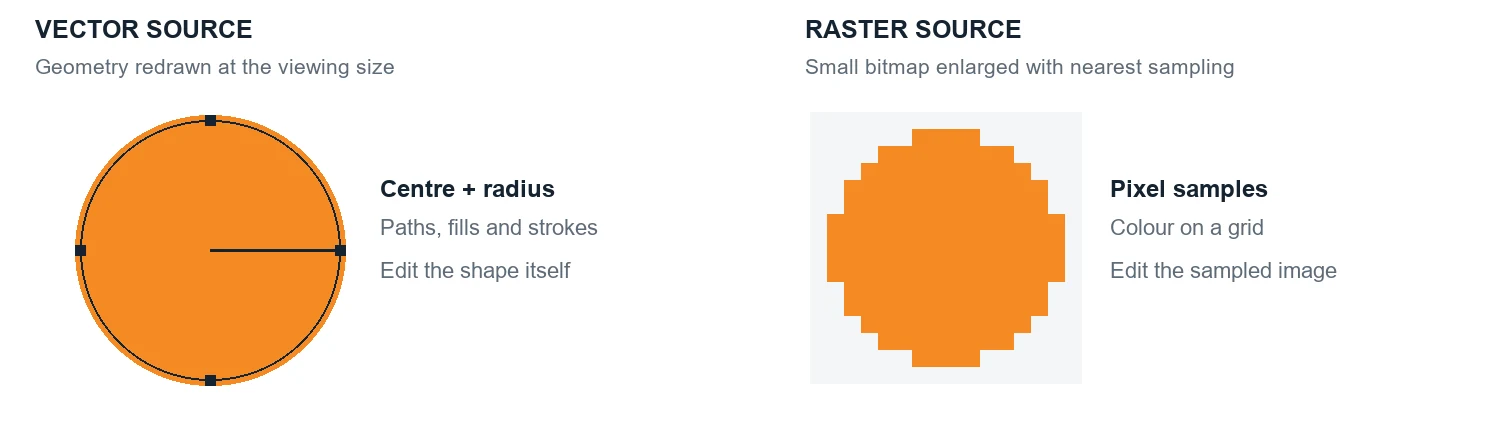
The advantage becomes clear when the output size changes. A vector circle can be redrawn for the new pixel grid. Enlarging a small raster circle requires estimating a larger grid from the samples already present. Nearest-neighbour sampling exposes the blocks; interpolating filters can smooth them, but cannot guarantee recovery of missing original detail.
Vectors are resolution-independent in this geometric sense. Embedded photographs, raster effects and output-device limits still constrain the finished result. A complex tracing of a photograph can also contain so many paths that it is harder to edit and larger than the original raster image.
Resolution, colour and compression
Pixel dimensions describe the grid: a 1920 × 1080 raster image contains 2,073,600 pixels. Changing a resolution label alone does not add samples. Resampling changes the pixel count by calculating new samples; it may improve presentation but does not automatically recover the photographed scene.
For printing, pixels per inch, or PPI, relates image pixels to physical size. A 3000-pixel-wide image placed at 300 PPI is 10 inches wide. Place the same unchanged image at 150 PPI and it is 20 inches wide. The suitable PPI depends on the job and viewing distance; 300 is an example, not a universal requirement. Printer dots per inch, or DPI, describes output dots and is not interchangeable with image PPI. 2426
Colour is another separate issue. RGB values need a colour-space interpretation, such as sRGB, to identify their intended appearance. Print workflows often convert to an ink-based space such as CMYK using an appropriate profile. Being vector or raster does not itself determine colour accuracy. Both can contain colours that a particular display or printing process cannot reproduce exactly.
Compression concerns storage. Lossless compression preserves the encoded image samples; lossy compression discards information to reduce data size. PNG uses lossless compression, while typical photographic JPEG uses lossy compression. Lossless does not mean infinitely detailed: a tiny PNG still has a tiny pixel grid. Repeatedly saving a lossy image can introduce further artifacts. 2325
File formats and mixed documents
SVG stores vector drawing instructions as XML text and can also embed raster images. A PDF can contain text, paths and photographs together. A layered editing file can contain pixel layers alongside text, paths or embedded objects. A file extension is therefore a clue, not a complete description of the contents. 125
Saving a photograph inside an SVG or PDF does not turn its pixels into editable vector paths. Converting genuine vector artwork into a PNG deliberately rasterises it at the chosen dimensions. Keep the original drawing when future resizing or object editing matters.
The reverse conversion is called tracing or vectorisation. Software estimates boundaries and fits shapes to a bitmap. It can work well for clean logos and line art. It is less direct for hair, grain, soft shadows and photographic texture, and it cannot reliably recover the original artist's construction, hidden shapes or layer structure.
Where each approach is useful
For a logo that must work on a business card, packaging and a sign, a carefully built vector master gives consistent geometry at different sizes. Typography and diagrams also benefit from editable outlines and precise alignment. Some manufacturing workflows can use vector paths, although cutters and other machines still need suitable dimensions and machine-specific preparation.
For photographs, painted textures, scanned artwork and richly shaded imagery, raster is usually a natural fit. It stores visual variation directly rather than requiring a separate geometric object for every patch of colour. A drawing does not have to be vector just because its edges are clean, and a vector illustration can be much richer than flat-colour clip art.
Most professional work combines the two. A magazine page can use vector text over a raster photograph. A game can combine 3D geometry with raster textures. A film title can place precisely animated lettering over camera footage. Choose the representation for each part of the project instead of forcing the entire project into one category.
What changes when AI creates the image
AI describes how an asset is produced; vector or raster describes how it is represented. A model can write drawing instructions, create pixel-based imagery, or help convert between representations. The key question is what the output actually contains and which properties remain editable.
How AI creates editable vector graphics
There are several routes to an AI-generated vector file. They produce different kinds of editability, even when the preview looks convincing.
Generating the drawing instructions directly
A language or multimodal model can generate SVG markup as a sequence of tokens. It may describe circles, rectangles, text and Bézier paths, then a renderer turns those instructions into a preview. StarVector is a documented research example of generating SVG code from images and text. 3
For a simple icon, this can produce compact geometry with useful object structure. But valid XML does not guarantee a good drawing. The result may contain an incorrect curve, an off-canvas element, a poor reading order or a single tangled path where a designer expected separate parts. Rendering and inspection remain part of the job.
Generating pixels and then tracing them
Another workflow begins with a raster image. A tracing or vectorisation process estimates regions and boundaries, then fits paths to them. It can work well for clean, flat artwork. Gradients, noise, hair and detailed textures often create many shapes. The result approximates the pixels; it does not recover the original designer’s layers, intended construction or hidden geometry.
An image that merely looks like vector art is still a raster image if the output is PNG or JPEG. Putting that image inside an SVG wrapper also leaves the picture raster-based. Inspect the actual elements before promising an editable logo or infinitely scalable illustration.
Optimising paths with an image model
Research also connects the two domains. A differentiable rasteriser lets an optimiser measure a rendered image and adjust vector parameters such as control points, colours and stroke widths. DiffVG demonstrates that bridge. SVGDreamer uses diffusion-based guidance in a vector generation workflow, with techniques aimed at separating objects and improving editability. 45
The important distinction is where the output lives. Guidance may come from an image model, while the final asset remains a collection of vector paths. “Made with diffusion” does not automatically mean “delivered as a bitmap.”
Before using an AI-generated SVG, check the paths at several sizes, simplify unnecessary points, verify fills and clipping, and give important parts meaningful names. Keep text editable when appropriate and check font availability. When exchanging SVG files, also check external resources, fonts and active content before using them in another application.
How AI creates raster images
Many image generators learn relationships between images and descriptions during training. At generation time, the prompt becomes numerical conditioning. A model then synthesises an image representation that fits that conditioning; it is not simply executing a list of drawing commands for every object.
In a common latent diffusion pipeline, an autoencoder provides a compressed numerical image space. Training teaches a network to predict how noisy representations relate to cleaner ones. During generation, a sampler repeatedly updates an initial noisy latent, guided by the prompt. A decoder converts the resulting latent into pixels. The latent diffusion paper describes this approach and its use of text conditioning. 6
A latent is neither an SVG nor a normal image file. It is a learned representation. Its channels are not necessarily red, green and blue, and they do not inherently correspond to editable layers such as “rocket,” “smoke” and “background.”
Diffusion is not the only formulation. Rectified-flow systems learn a velocity field that transports samples from noise towards data along a learned generation process. A transformer can supply the network architecture for that process. Architecture describes how the network is built; diffusion or flow matching describes the learning and sampling formulation. They are not competing file formats. 710
Some models instead use autoregressive or other generative approaches. Public documentation differs across systems, so “all AI images are made by removing noise” is too broad. The underlying methods can also change between model versions.
For creative work, resolution, aspect ratio, seed, conditioning and sampling settings can all matter. More sampling steps do not universally mean better results, especially for models trained for few-step generation. A seed helps reproduce a run only when the model, settings, implementation and relevant sources of randomness are also controlled.
Upscaling can add plausible detail or reduce visible artifacts. It cannot guarantee that newly invented detail was present in the intended scene. The same caution applies when a generated image looks realistic: visual plausibility is not evidence of physical or factual accuracy.
How animation works when the scene is explicit
Animation changes a scene over time. An authored scene might contain vector paths, bitmap layers, text, 3D meshes or a mixture. Keyframes record values at chosen times. Interpolation calculates the values between them, and easing changes how quickly those values progress.
Suppose a circle moves from x = 20 to x = 180 in two seconds. With normalised progress u between 0 and 1, linear interpolation gives x(u) = 20 + 160u. At halfway, x is 100. An ease-in curve changes the progression of u so the movement begins slowly, while preserving the endpoints.
Traditional frame-by-frame animation creates a succession of drawings or images. Rigged 2D animation moves connected parts or deforms artwork using controls. In 3D animation, meshes, rigs, materials, cameras and lights define a scene, which is rendered over time. These methods can mix vector elements and raster assets; 3D geometry is not simply another name for a 2D vector illustration. 27
At 24 frames per second, one second of delivered video contains 24 displayed frames. That does not require 24 unique hand-drawn pictures: a production may hold drawings for multiple frames, interpolate movement or render each frame from an animated scene. Frame rate describes temporal sampling, while image resolution describes spatial sampling.
Code can also define the artwork and its motion. For example, SVG can define shapes, with CSS, JavaScript or declarative animation controlling them. The Web Animations API exposes timing, keyframes and playback controls. An animation program can also react to a click or slider instead of playing a fixed sequence. 11
A complete small vector animation
This small example uses a browser as a convenient animation player. It moves an orange circle between two positions. Put it in an HTML file to run it. A reduced-motion preference leaves the circle still. The code defines the geometry and timing; no generated video frames are stored in the source.
<svg viewBox="0 0 200 80" width="400" role="img"
  aria-labelledby="motion-title" style="max-width:100%">
  <title id="motion-title">Orange circle moving sideways</title>
  <circle id="dot" cx="20" cy="40" r="12" fill="#ff8a1f" />
</svg>
<script>
  const dot = document.querySelector('#dot');
  const preference = matchMedia('(prefers-reduced-motion: reduce)');
  const motion = dot.animate(
    [{ transform: 'translateX(0px)' }, { transform: 'translateX(160px)' }],
    { duration: 2000, iterations: 2,
    direction: 'alternate', easing: 'ease-in-out' }
  );
  function respectMotionPreference() {
    if (preference.matches) { motion.pause(); motion.currentTime = 0; }
    else motion.play();
  }
  preference.addEventListener('change', respectMotionPreference);
  respectMotionPreference();
</script>For a custom simulation, requestAnimationFrame schedules updates before browser repaints. Movement should use elapsed time, rather than adding a fixed amount per frame; otherwise a high-refresh display can run the simulation faster. A simulation may also need a fixed physics timestep and interpolation for stable motion. 12
The display still shows pixels. “Vector animation” describes the retained source geometry and motion, not a special kind of screen. Export the same animation to a conventional MP4 and the deliverable becomes encoded raster frames. Keep the SVG or project source if future object-level editing matters.
How generative AI video creates motion
Generating a video requires relationships across both space and time. If every frame were produced independently, a character’s face, clothing or position could change unexpectedly. Video models therefore need ways to connect information across moments.
One documented approach compresses video with a spatiotemporal autoencoder and generates within that latent space. Text conditioning guides the process, while transformer attention connects information from patches across space and time. CogVideoX is a research example combining a video VAE with a diffusion transformer. 8
The word “3D” in a video VAE commonly refers to height, width and time. It does not automatically mean the model has created an editable three-dimensional scene with meshes, cameras and lights. Similarly, a diffusion step is not a video frame: one generation step can refine information associated with many frames.
HunyuanVideo documents another combination: a video VAE, transformer architecture and flow-matching training. Instead of describing every update as removing predicted noise, flow matching can be understood as predicting directions that move a sample towards a plausible video. 910
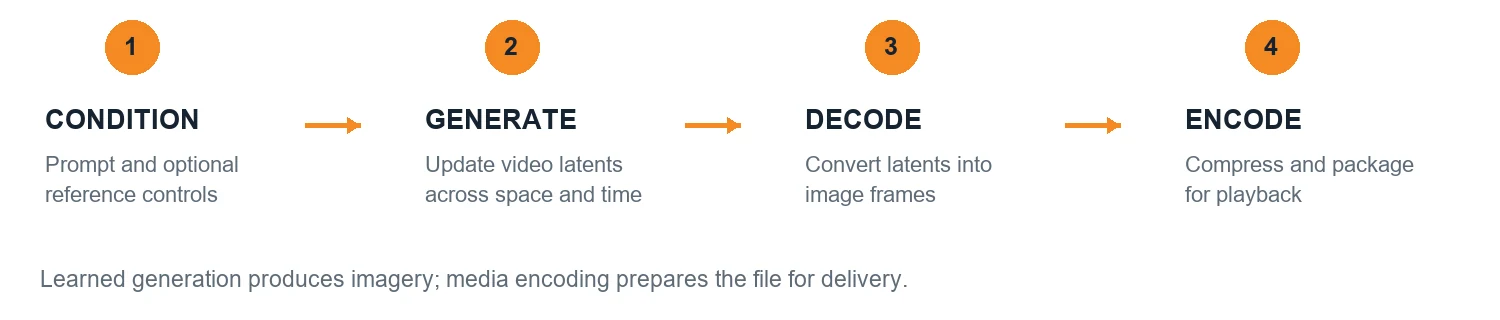
Inputs may include text, a reference image, a starting frame, pose information or other controls, depending on the system. Some models generate blocks of frames; others use autoregressive or hybrid approaches. Conditioning can improve control without guaranteeing that every requested detail or physical interaction will be correct.
After generation, a learned decoder produces image frames. Additional stages may upscale them, interpolate intermediate frames or process audio. These stages are optional and model-dependent. The rendered sequence is then encoded for storage and playback. 8913
A codec such as H.264, HEVC or AV1 compresses video. MP4 and WebM are containers that package streams and metadata. A model’s generation method and the exported file’s codec solve different problems. Modern video compression can predict blocks across frames and encode differences; it does not preserve the original scene as editable vector objects. 1314
That is why changing a generated actor’s jacket or the exact shape of a moving logo may involve regeneration, masking, tracking or compositing. The pixels are available, but a clean, persistent object with the expected editable properties may not be. Good-looking footage and exact instruction following are different qualities.
Choosing a workflow for the job
The useful comparison is explicit scene control versus learned image synthesis. Both run on code, and AI can participate in either. Code can draw pixels or render 3D; a vector illustration can be drawn by a person; generative footage can be combined with exact typography and graphics.
| Requirement | A useful starting point | What to check |
|---|---|---|
| Logo or diagram that must stay editable | SVG with clean groups and paths | Geometry and text remain editable |
| Interactive learning tool | Programmed SVG, Canvas or 3D scene | Inputs change real state and calculations |
| Photographic illustration or texture | Raster generation and image editing | Resolution, colour and factual accuracy |
| Atmospheric or cinematic shot | Generative video with references | Continuity, motion and prompt alignment |
| Precise product demonstration | Authored 3D or measured animation | Dimensions, timing and camera control |
| Brand film with exact labels | Generated or filmed imagery plus authored overlays | Logo spelling, placement and safe areas |
Imagine a rocket in an educational film. Its diagram, trajectory and numerical labels can follow an exact, authored animation. Generated footage can supply a cinematic launch shot. The two assets serve different purposes: one explains controlled relationships, while the other supplies imagery. Both can appear in the same finished sequence.
For a science lesson, keep the calculation and labels in an explicit model. A generated clip can help introduce an idea, but it should not silently become the authority for orbital mechanics, electricity or anatomy. Validate the explanation against the intended science, not against how convincing the animation looks.
A practical production sequence
Start by listing what must remain exact: text, brand colours, geometry, timing, calculations and interaction. Then separate those requirements from appearance choices that can tolerate variation. Choose the source formats accordingly and save them alongside exported media.
Use references and short tests before producing a long sequence. Review silhouettes, continuity, edge quality and legibility at the sizes people will actually see. Composite precise labels and graphics where necessary. Check colour management and encoding after export; a correct source can still become soft, banded or unreadable in delivery.
Test the actual destination: a printed proof, projected slide, phone screen, video player or interactive application. Check physical size, colour, sharpness, timing and accessibility as appropriate. A source that looks correct in an editing program can change when converted, compressed or displayed elsewhere.
Questions readers often ask
Is vector always better than raster?
No. Vector is useful for geometry that needs to remain editable and scale cleanly. Raster is useful for sampled detail, photography and painting. A good workflow often preserves both kinds of source.
Does changing a file extension convert the image?
No. Renaming photo.jpg to photo.svg does not rewrite the image as paths. Real conversion needs a suitable encoder, rasteriser or tracing process, and each changes what can be preserved.
Why does an AI model also use the word vector?
In machine learning, a vector is an array of numbers, such as an embedding or latent representation. That mathematical use does not mean the model is producing a vector drawing. Editable drawing geometry must actually be present in the output.
Can AI create a real SVG file?
Yes. It can generate SVG instructions directly, optimise vector paths or assist a tracing workflow. Check the file itself: an embedded bitmap inside an SVG is not the same as editable vector geometry. 135
Does vector style mean vector format?
No. “Vector style” usually describes an appearance with clean shapes and flat colours. A PNG in that style remains a raster image. The format and underlying elements determine what can be edited or rescaled.
Is AI video just many AI images played quickly?
The final output is a sequence of frames, but modern video models can generate with temporal relationships built into the model. Producing independent images is a different workflow and does not automatically preserve continuity. 89
Can vector animation be made entirely with code?
Yes. Geometry, styling, timing and interaction can all be authored in code. That does not make every coded animation vector: Canvas and 3D renderers also use code, and their displayed output is rasterised.
Can a video be converted back into editable animation?
Parts can be traced, tracked, segmented or reconstructed. This is an estimation process. It does not reliably recover the original paths, rigs, layers, keyframes or hidden surfaces from a flattened video.
Does higher resolution guarantee a better result?
No. Here, resolution describes the image’s pixel dimensions, not correct drawing, continuity, composition or meaning. For generated work, inspect the content as well as the pixel count.
Keep the source that gives you control
Before choosing an AI tool, decide what you want to change after the first result. If the answer includes exact paths, labels, timing or interaction, preserve an explicit scene or code source. If it is primarily the appearance of a shot, a raster or video workflow may be the right starting point. Many useful projects need both.
A useful way to learn the distinction is to create the same simple circle twice: once as an editable path, and once as a small bitmap. Enlarge both, change their colours, animate their position, and export them. Watching what survives each step makes the difference tangible: geometry, sampled appearance and motion are related, but they are not the same thing.
Words in plain English
- Pixel
- One coloured square in a raster image, stored as numbers (usually red, green and blue).
- Raster image
- A picture stored as a grid of pixels. Photos, screenshots and digital paintings.
- Vector graphic
- A picture stored as shapes, lines, curves and text with colours, so it can be redrawn at any size.
- Path
- A line or outline in a vector drawing, made of straight segments and curves.
- Bézier curve
- A smooth curve controlled by a few points, used for almost every curved outline in design software and fonts.
- Rasterisation
- Turning vector shapes into pixels so a screen or printer can show them.
- Anti-aliasing
- Giving edge pixels in-between shades so curves and diagonals look smooth instead of stair-stepped.
- Resolution
- How many pixels an image has, for example 1920 × 1080.
- PPI and DPI
- PPI is image pixels per printed inch; DPI is ink dots a printer lays down per inch. They are related but not the same.
- Lossless and lossy
- Lossless compression (PNG) keeps every pixel exactly; lossy compression (JPEG) throws some detail away to save space.
- Tracing (vectorising)
- Software that guesses shapes from a pixel image and turns them into vector paths. An estimate, not the original drawing.
- Keyframe
- A value you set at a moment in an animation, such as a position at 0 and 2 seconds.
- Interpolation and easing
- Filling in the frames between keyframes, and controlling how the speed changes along the way.
- Frame rate
- How many pictures are shown per second of video, such as 24 or 30.
- Latent
- The compressed set of numbers an AI model works on before it becomes a visible image.
- Diffusion
- A way of generating images by starting from noise and refining it step by step.
- Codec and container
- A codec (H.264, AV1) compresses video; a container (MP4, WebM) packages the video, audio and details into one file.
Technical reference
Supporting detail for developers, designers and editors.
Geometry, pixels and rendering
SVG paths support commands such as M for move, L for line and C for a cubic Bézier curve. A cubic curve uses endpoints P0 and P3 plus control points P1 and P2. Its position for parameter u is B(u) = (1 − u)³P0 + 3(1 − u)²uP1 + 3(1 − u)u²P2 + u³P3. Equal increments of u do not generally travel equal distances along the curve. Uniform motion needs distance-based sampling or an arc-length approximation. 2
An SVG viewBox establishes user-space coordinates; viewport sizing and preserveAspectRatio govern how that space fits the display. Group transforms can translate, rotate and scale related elements. When morphing paths, correspondence matters: incompatible command structures usually require normalisation or a dedicated morphing algorithm rather than simple number interpolation. 12
Rasterisation evaluates geometry into pixel coverage. Anti-aliasing smooths the visible edges by accounting for partial coverage. It improves sampling; it does not turn a low-resolution bitmap into retained vector geometry. Canvas drawing commands can describe curves, but the canvas backing store is a bitmap rather than a retained SVG object tree.
Resolution and bandwidth example
Uncompressed 1920 × 1080 RGB at 8 bits per channel needs 1920 × 1080 × 3 = 6,220,800 bytes per frame, about 6.22 MB in decimal units. At 30 frames per second, that is about 186.6 MB per second or 11.2 GB per minute, before audio and overhead. Adding an alpha channel changes the calculation. Real video files usually use compression and may use different colour sampling and bit depths. 14
Frame rate, resolution and bitrate describe different things. Frame rate counts displayed samples per second. Resolution gives the spatial grid. Bitrate measures encoded data per second. A high bitrate cannot repair an incorrect source, and frame interpolation estimates intermediate imagery rather than restoring ground-truth events.
A compact model of latent generation
In a simplified diffusion training description, a clean latent z0 becomes a noisy latent zt = αt z0 + σt ε, where ε is sampled noise and αt and σt control the schedule. Depending on the formulation, the network may predict noise, clean data or a related parameterisation. The inference solver uses those predictions to update a sample. This equation describes the representation process, not a universal recipe for every product. 6
For a simple flow-matching path, zt = (1 − t)ε + t zdata. A network can learn the corresponding velocity and an ODE solver integrates dz/dt = vθ(z,t,c), with c representing conditioning. The path, target and solver vary across implementations. More integration steps change compute and approximation; they do not directly specify how many frames a video contains. 710
A VAE is a variational autoencoder used to learn a latent representation and decode it. A DiT is a diffusion transformer architecture. Attention passes information among tokens, while conditioning introduces information such as text or images. Do not confuse a numerical latent vector with a vector graphic: one is a learned array of numbers, the other is an explicit drawing representation.
Source files and delivery files
| Source or format | What it can contain | What to preserve |
|---|---|---|
| SVG | Geometry, text, styling and optional raster content | Named groups, paths, fonts and viewBox |
| PNG or JPEG | Raster image samples with compression | High-quality master and colour profile |
| Canvas or WebGL application | Code state and rendering instructions | Source code, assets and dependency versions |
| 3D project | Geometry, materials, cameras, rigs and animation | Project assets, simulation settings and caches |
| MP4 or WebM | Encoded media streams in a container | Editable source plus delivery settings |
Colour values only make sense in context. Record the intended colour space and verify conversions between image, print and video workflows. For small coloured text, chroma subsampling and compression can soften edges. Test final playback rather than assuming the editing preview matches every delivery path.
Sources and further reading
Primary specifications, research papers and official documentation support the technical explanations. The examples, comparisons and diagrams in this document are original editorial material. Research checked on 23 October 2026; architectures and search features can change.
- W3C SVG specification — SVG document structure, shapes, styling and rendering.
- W3C SVG paths — Path commands, Bézier curves and path data.
- StarVector — Research on generating SVG code from images and text.
- Differentiable Vector Graphics Rasterization for Editing and Learning — DiffVG research project and paper.
- SVGDreamer — Text-guided SVG generation with diffusion guidance.
- High Resolution Image Synthesis with Latent Diffusion Models — Autoencoder latent space, diffusion and conditioning.
- Scaling Rectified Flow Transformers for High Resolution Image Synthesis — Rectified flow and transformer architecture.
- CogVideoX — Video VAE and diffusion transformer architecture.
- HunyuanVideo — Video VAE, transformer architecture and flow matching.
- Flow Matching for Generative Modeling — Continuous flows and probability paths.
- MDN Web Animations API — Timing, keyframes, playback and motion accessibility.
- MDN requestAnimationFrame — Browser repaint scheduling and timestamp-based motion.
- FFmpeg detailed description — Frames, encoders, packets and media containers.
- MDN web video codec guide — Encoding, compression and delivery tradeoffs.
- Google Search title links — Descriptive titles and generated search appearance.
- Google Search snippets — Meta descriptions and snippet selection.
- Google Article structured data — BlogPosting properties and implementation guidance.
- Google Search documentation updates — FAQ rich result retirement and documentation changes.
- Google AI features and websites — Content accessibility and ordinary SEO fundamentals.
- Google Search technical requirements — Crawl access, successful responses and indexable content.
- Google Core Web Vitals — Loading, responsiveness and visual stability.
- Google Video SEO best practices — Video discoverability and watch page requirements.
- W3C PNG specification — Pixel channels, bit depths, transparency and lossless compression.
- Adobe image size resolution and resampling — Pixel dimensions, print size and resampling.
- Adobe supported image formats — Raster, vector and mixed document formats.
- Autodesk printing documentation — Image pixels per inch and printer dots per inch.
- Blender armatures — Bones, poses and skeletal animation controls.