Choose a vivid turquoise on your phone, print it, then try to mix matching paint. You may end up with three perfectly reasonable turquoises that disagree with one another. Take the paint sample into another room and a fourth version seems to appear.
The explanation starts with a distinction we often overlook. A colour name describes an appearance, but it does not explain how that appearance was produced. Light sources, coloured surfaces, digital files and our visual system all contribute. Matching their results means understanding what each part can change.
Colour happens between light and the brain
Light reaching your eyes contains a distribution of wavelengths called a spectrum. Sunlight contains a broad mixture. A lamp can supply a different mixture, even when both sources look approximately white.
An ordinary painted surface absorbs some of the incoming light and reflects some towards you. Its appearance therefore depends on both the illumination and the material. A red object cannot reflect wavelengths that its light source does not supply. 1
Most people have three classes of cone cells with overlapping wavelength sensitivities. These are commonly described as short, medium and long wavelength cones. Your visual system interprets their combined responses; it does not read a separate colour label attached to every wavelength. Different spectra can therefore produce matching colour appearances under particular conditions. 12
This helps explain metamerism. Two samples with different spectral reflectance patterns may match under one lamp and separate under another. A match under shop lighting is consequently evidence about that lighting, rather than a guarantee for every room. Differences between observers can also affect a match. 2
Screens add light
A typical colour display controls red, green and blue light contributions. At ordinary viewing distances, the small components blend perceptually into the image. This is additive colour mixing. Increasing a contribution adds light to the mixture. 3
Suitable red and green lights together can look yellow; green and blue can look cyan; red and blue can look magenta. Combining all three in the appropriate balance produces the display's white. That yellow appearance does not require the screen to emit a narrow band of yellow wavelengths. 3
The balance matters. “Equal amounts make white” is a useful classroom shortcut, but the required physical intensities depend on the chosen primaries. Furthermore, ordinary RGB file numbers are encoded values. Predicting physical light addition requires converting them to linear light values first. 7
Pigments remove some light and redirect the rest
The familiar subtractive model begins with incoming light. In its idealised form, cyan absorbs red, magenta absorbs green and yellow absorbs blue. Combining cyan and yellow leaves mainly green to reach the viewer. Each added filter removes another part of the available light. 4
Printing commonly uses cyan, magenta, yellow and black, abbreviated CMYK. Black ink provides dark detail and a more practical neutral black than relying entirely on the three coloured inks. The paper is part of the result too. An unprinted area usually supplies the paper's own white, unlike the illuminated white of a display. 5
| Medium | What creates the visible colour |
|---|---|
| Screen | Controlled contributions of red, green and blue light |
| Process print | Inks absorb light while the paper contributes reflected light |
| Paint | Pigments absorb and scatter light within a material layer |
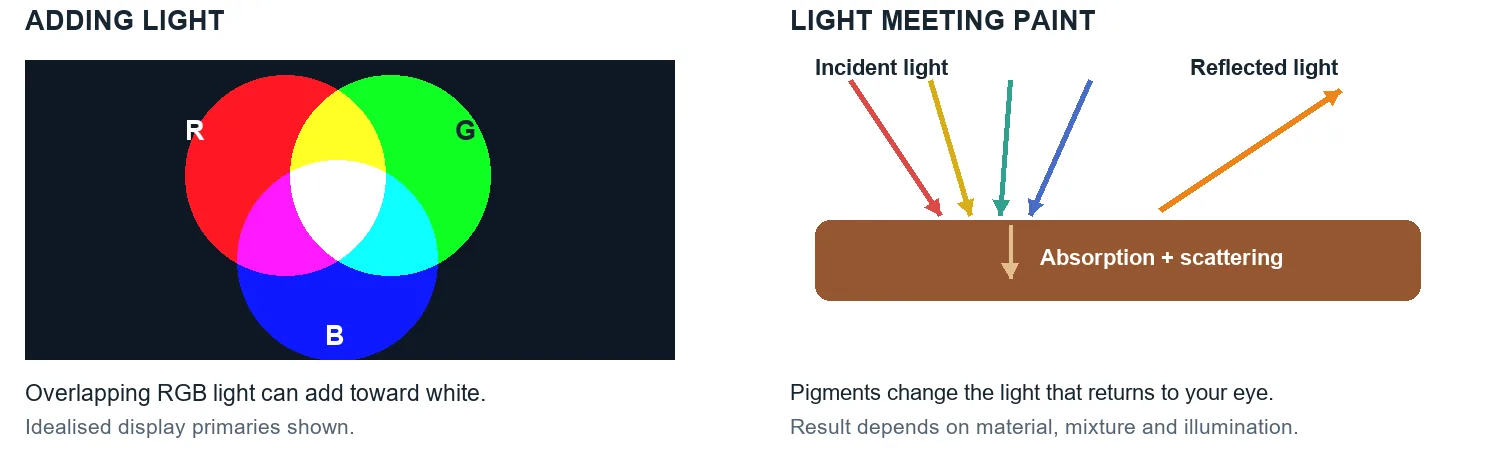
Real paint adds complications. Pigment particles scatter light as well as absorb it, and the surrounding binder affects that interaction. Particle size, pigment concentration, layer thickness and surface sheen all influence the appearance. A thin glaze over white can behave very differently from a thick stroke of the same paint. 6
Mixing ratios matter because pigments have different tinting strengths. A small addition of one paint may strongly shift another. Similar-looking tubes can behave differently on the palette, so ideal CMY diagrams cannot supply exact proportions for arbitrary paints. Record the products and proportions when a mixture works, then judge a dry sample on the intended surface. 6
Colour numbers need a defined meaning
RGB describes a colour model. A colour space such as sRGB or Display P3 supplies more specific definitions, including the primaries and white point. The same three numbers can represent different colours in different spaces. 7
A gamut is the range of colours a space can represent or a device can reproduce. Display P3 has a wider gamut than sRGB, but neither represents every visible colour. A printer and its paper have another gamut. Their boundaries differ, so some colours require adjustment during conversion. 7
Bit depth describes something else. It determines how many numerical steps are available for encoding colour components. Eight bits per RGB channel gives 256 values per channel. More steps can represent finer differences within a given space; increasing bit depth alone does not enlarge that space's gamut. Think of a map's territory and the fineness of its coordinate grid as separate properties. 57
An image profile identifies how its numbers should be interpreted. A monitor profile describes the display, while a printer profile describes an output condition, including ink and paper. Colour management uses this information to translate between them. 8
A profile improves translation within the devices' capabilities. Consistency depends on accurate profiles and controlled viewing conditions. An unlabelled RGB value is an incomplete specification. 78
White balance and grading solve different problems
A photograph introduces another interpretation of the scene. White balance adjusts the image to account for the illumination, often using a known neutral area as a reference. Temperature controls address the warm-to-cool direction; tint controls commonly address green-to-magenta shifts. 9
Suppose a white mug looks orange in a photograph taken under warm indoor lighting. Adjusting white balance can bring the mug towards neutral. With daylight on one side and a warm lamp on the other, however, one global adjustment may not make both sides neutral. The scene contains two different lighting conditions.
Colour correction is the broader work of resolving unwanted casts, exposure differences and inconsistencies between shots. Colour grading shapes the intended appearance through choices about colour and contrast. An editor might first match two camera angles, then give the whole sequence restrained saturation and warmer highlights. 10
Those choices can support a particular story, but colours do not carry a fixed emotional instruction for every viewer. A blue image can depict cold weather, an evening scene or an artistic preference. Context gives the choice its meaning.
Follow one turquoise through three materials
Imagine making a poster for a community art event. You choose a luminous turquoise on a laptop, want printed flyers, and plan to paint a matching sign.
For the digital file, preserve its profile and judge it on a display whose settings you understand. An unusually bright screen makes comparison with reflective paper more difficult. 8
For the flyers, ask which file space and output conditions the printer expects. Conversion may move an unprintable turquoise towards a reproducible colour. A physical proof gives you something concrete to approve on the chosen paper. 78
For the sign, start with the approved reference and make a paint sample. Compare the dry result under its intended lighting. The paint formulation, surface and illumination determine whether the match remains convincing. 26
The useful decision is which appearance must take priority. For an outdoor event, you might approve the painted sign and printed flyer in daylight, then adjust the digital artwork to coordinate with them. That is a deliberate design choice with an observable reference.
Try changing the light before changing the colour
Place two similar coloured items, such as a painted sample card and a piece of fabric, beside a sheet of white paper. Examine them in indirect daylight, then under a warm household lamp. Keep them side by side and use the same viewing angle. Ordinary room lighting is sufficient.
Note whether the items remain a good match, and whether one shifts more noticeably than the other. If a close match separates, different spectral reflectance patterns are a possible explanation. If they remain similar, try another pair; metamerism is not equally obvious in every combination. 2
You can also photograph both arrangements, but use your eyes for the initial comparison. Automatic white balance can change between photographs, adding a camera adjustment to the lighting change you are trying to observe. If your camera allows it, lock white balance for the comparison and label the photographs with their lighting conditions. 9
Questions readers often ask
Why does red and green light make yellow while the paints often make brown?
The lights add their contributions. Paint mixtures absorb and scatter the incoming light, often leaving a darker, less saturated result. The exact paint mixture depends on the pigments and their proportions, so brown is a common outcome rather than a universal equation. 346
Can I get an exact paint formula from a hex code?
A hex code identifies digital colour values, usually interpreted as sRGB in common contexts. It contains no information about pigment strengths, binder or surface. A matching service can propose a formulation, but a physical sample under the intended lighting is the meaningful check. 67
Will a better monitor make every print match?
An accurate, profiled monitor improves your decisions. The print still depends on inks, paper, gamut and illumination. Colour management helps predict differences; a physical proof is useful when the match matters. 8
Sources and further reading
Specifications, research papers and official documentation support the technical explanations. The examples and diagrams are original editorial material. Research checked on 23 October 2026.
- American Museum of Natural History — How We See Color — How We See Color — Institutional explanation of reflected light, cone responses and the brain's role in colour perception.
- CIE — Special metamerism index Change in observer — Special metamerism index Change in observer — Defines metameric matches and explains how changes in illuminant or observer can break them.
- University of Wisconsin–Madison — Additive Color Mixing — Additive Color Mixing — Museum demonstration of RGB light mixing and its distinction from paint mixing.
- University of Wisconsin–Madison — Subtractive Color Mixing — Subtractive Color Mixing — Explains the ideal cyan, magenta and yellow filter model and wavelength absorption.
- CorelDRAW Help — Understanding color models — Understanding color models — Software maker's explanation of RGB encoding, CMYK components, black ink and paper white.
- Golden Artist Colors — The Subtleties of Color — The Subtleties of Color — Manufacturer's technical discussion of pigment scattering, tint strength, film thickness, concentration and sheen.
- W3C — CSS Color Module Level 4 — CSS Color Module Level 4 — Defines colour spaces, linear light addition, gamuts and colour conversion between output capabilities.
- Adobe — About color profiles — About color profiles — Explains document, monitor, input and output profiles, including the effect of ink and paper.
- Adobe — Adjust basic color correction in Premiere — Adjust basic color correction in Premiere — Describes white balance, neutral references, temperature, tint and tonal adjustments.
- Adobe — Video color correction and color grading — Video color correction and color grading — Distinguishes technical correction and shot matching from creative colour and contrast choices.